Digital Financial Inventory: A Smarter Way for Life Insurance Agents to Manage Client Information
How Digital Financial Inventory extends GoHighLevel for life insurance agents by collecting insurance-specific client information, creating CRM contacts, and letting agents reopen and update existing inventories directly from the contact record.
DRGHL
GoHighLevel developer
Life insurance agents need accurate client information to make informed recommendations. But collecting that information, organizing it, keeping it updated, and making it accessible inside a CRM can become a frustrating process.
Digital Financial Inventory was built to solve that problem.
Digital Financial Inventory is a custom application designed for life insurance professionals using GoHighLevel (GHL). It gives agents a dedicated financial-inventory interface inside their GHL environment, allowing them to collect insurance-specific client information and keep that information connected to the client record.
Instead of relying on scattered notes, spreadsheets, or separate forms, agents can work with the information directly within their existing CRM workflow.
What Is Digital Financial Inventory?
Digital Financial Inventory is a client profile management application built around the information life insurance agents need during the client process.
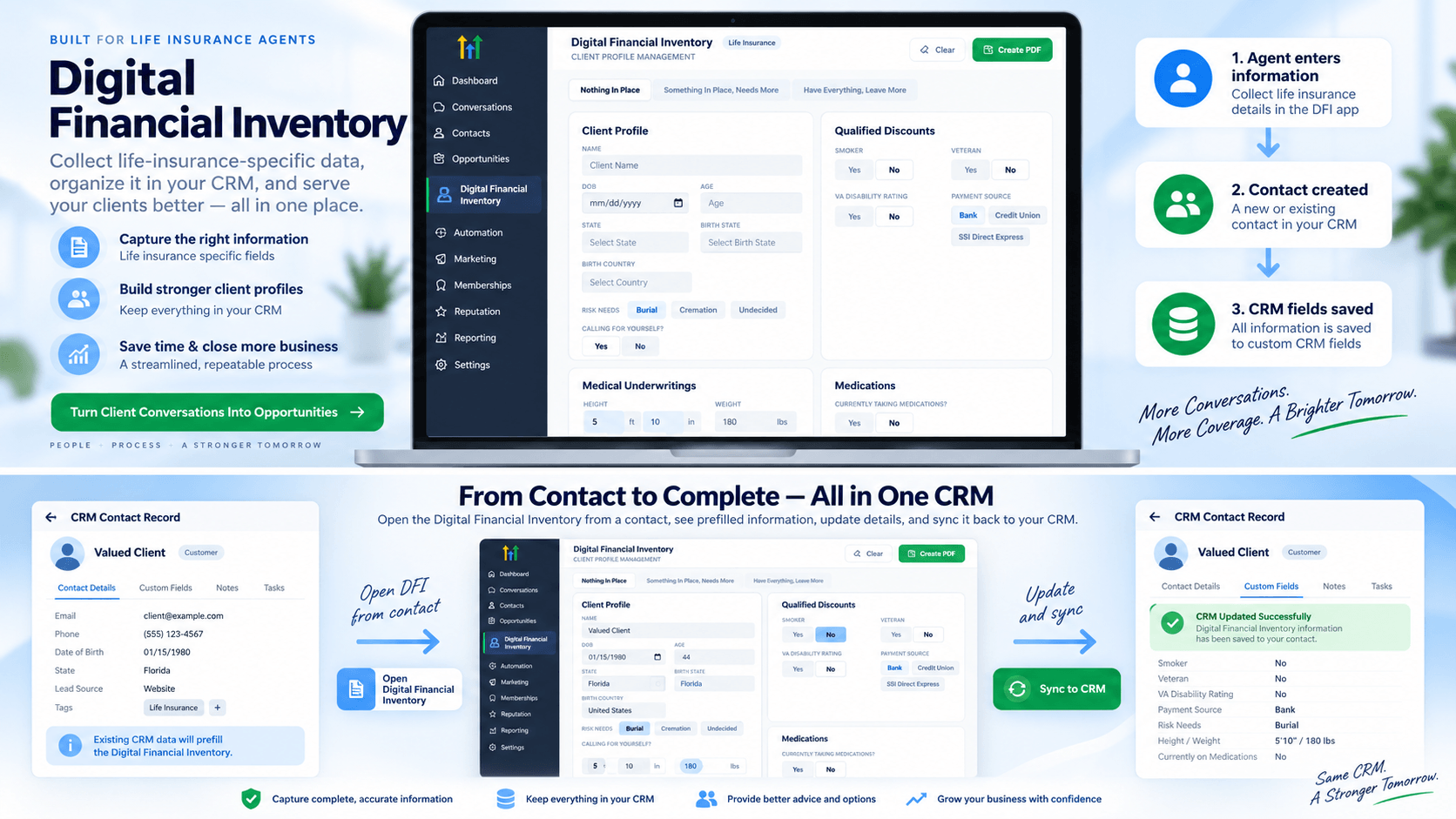
The application provides a customized menu where agents can enter important client and financial information, including:
- Client profile information
- Date of birth and age
- State and birth state
- Birth country
- Existing coverage status
- Funeral and final-expense needs
- Qualified discounts
- Veteran status
- Smoking status
- VA disability rating
- Payment source
- Medical underwriting information
- Medications
- Other insurance-related information
The goal is simple: give agents a structured place to collect the information they need while keeping that information connected to the CRM.
Built Inside the GHL Workflow
One of the biggest advantages of Digital Financial Inventory is that agents don't have to completely change the way they work.
The application is designed to work within the GHL environment.
An agent can open the custom Digital Financial Inventory menu and begin entering the client's information. Once the inventory is submitted, the application creates the contact and stores the relevant information in the GHL CRM through the corresponding custom fields.
This creates a bridge between a specialized insurance data-collection experience and the CRM where the agent already manages clients.
The workflow
Agent opens Digital Financial Inventory
↓
Agent enters client information
↓
Inventory is submitted
↓
Contact is created in GHL
↓
Insurance-specific information is stored in CRM fields
↓
Agent can access and update the inventory later
The inventory isn't just a standalone form. The information becomes part of the client's CRM record.
Why CRM Integration Matters
Collecting information is only half the challenge.
The real value comes from being able to use that information later.
Imagine an agent completes a financial inventory for a prospect today. A few weeks later, the agent needs to review the client's situation or update some of their information.
Without a connected system, the agent may have to search through emails, documents, spreadsheets, or previous notes.
With Digital Financial Inventory, the information is connected to the contact inside GHL.
The agent can open the client's record and access the inventory again.
Open the Inventory Directly From the Contact
Another important part of the application is the ability to open Digital Financial Inventory from the contact details page.
When an existing client is opened, the application can retrieve the information that has already been saved.
Instead of starting from a blank form, the agent gets an inventory with the existing information pre-filled.
That makes the application useful beyond the initial data-collection process.
The agent can review the existing information, make changes, and update the client's profile as their circumstances change.
From Data Collection to Ongoing Client Management
This is where Digital Financial Inventory becomes more than a simple form.
A client's financial and insurance situation isn't necessarily static. Information can change over time.
A client may:
- Acquire new coverage
- Change their payment source
- Have a change in medical information
- Update their financial priorities
- Change their final-expense preferences
- Become eligible for a particular discount
- Need additional coverage
Instead of treating the financial inventory as a one-time questionnaire, agents can use it as an ongoing client profile.
The information starts with the initial conversation and can continue to evolve as the client relationship develops.
Designed Around Insurance-Specific Information
Generic CRM forms aren't always designed around the workflow of a life insurance agent.
Digital Financial Inventory takes a different approach.
The interface organizes information into categories that are relevant to the insurance conversation.
The application includes sections such as Client Profile, Qualified Discounts, Medical Underwritings, and Medications, along with coverage status and other client information.
This gives agents a more structured way to work through the information instead of trying to fit an insurance-specific process into a generic CRM form.
A Cleaner Experience for Agents
The application also focuses on making the data easier to work with.
Rather than presenting every field as one long list, information is organized into distinct sections. Client profile information can be handled separately from qualified discounts, medical underwriting, medications, and other categories.
The result is a workflow that feels more like a purpose-built insurance application than a collection of generic CRM fields.
For agents, that can make the process easier to understand and easier to repeat.
Why We Built It
The idea behind Digital Financial Inventory came from a straightforward observation:
Life insurance agents need information that their CRM doesn't necessarily provide out of the box.
GHL provides powerful CRM and automation capabilities, but businesses often need custom workflows to match the way their industry actually operates.
Instead of forcing the agent to adapt their process around generic CRM functionality, Digital Financial Inventory adds a specialized layer on top of the existing CRM.
The agent gets a purpose-built interface.
The CRM gets structured client information.
And the client record becomes more useful over time.
The Bigger Opportunity With Custom CRM Applications
Digital Financial Inventory is also an example of what is possible when a CRM is extended with a custom application.
Businesses don't always need to replace their existing CRM to solve a workflow problem.
Sometimes, the better approach is to build a specialized application that works alongside the CRM and fills the gaps.
In this case, the custom application provides the insurance-specific experience while GHL remains the central CRM.
That approach can be especially powerful for agencies with specialized processes that don't fit neatly into an off-the-shelf CRM workflow.
Final Thoughts
Digital Financial Inventory was created to make life insurance client information easier to collect, organize, access, and maintain.
The application gives agents a dedicated interface for insurance-specific information while connecting that information back to the client's GHL CRM record.
Most importantly, the workflow doesn't end after the first submission.
Agents can return to the client's contact record, reopen the inventory with existing information already populated, and update it as needed.
Collect it once. Keep it connected. Update it when things change.
That's the idea behind Digital Financial Inventory—and it's a good example of how custom applications can turn a general-purpose CRM into a workflow designed around the specific needs of an industry.
If your agency needs an industry-specific app connected to GHL, you can hire a GoHighLevel developer to build it — book a discovery call.
Related reading
Comments
Topics