How to Add a Before & After Slider to GoHighLevel Funnels
A before-and-after slider is a simple way to showcase visual transformations inside GoHighLevel funnels. Learn how the widget works, where to use it, and why reusable funnel widgets can save development time.
DRGHL
GoHighLevel developer
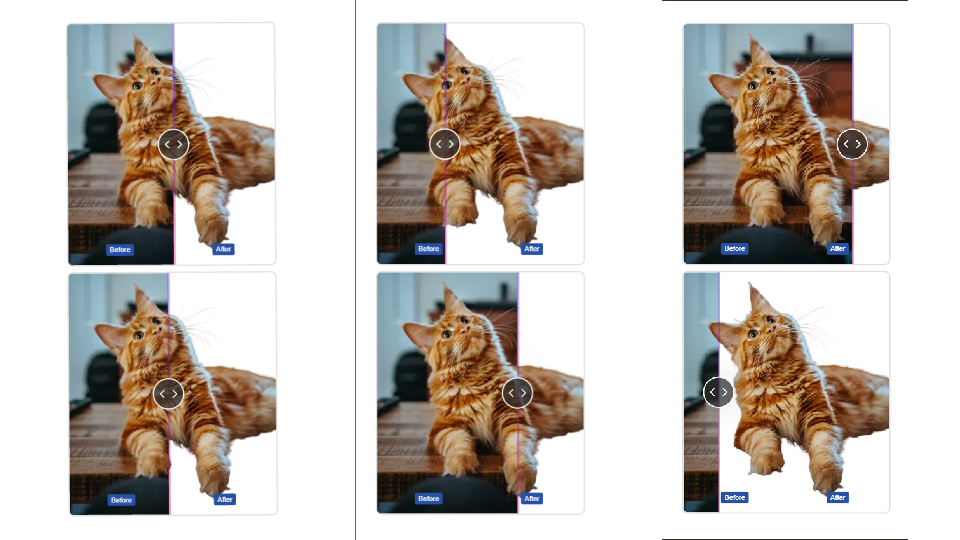
A before-and-after comparison can communicate a transformation faster than a long block of copy. For agencies and funnel builders, that makes an interactive before and after slider a useful addition to landing pages, sales funnels, portfolios, case studies, and service pages.
We built a public GoHighLevel widget specifically for this use case. It lets funnel builders add an interactive transformation comparison without having to build the slider from scratch.
What is a before and after slider?
A before and after slider places two versions of an image on top of each other and gives the visitor a draggable divider. Moving the divider reveals more or less of the “before” and “after” image.
This works especially well when the visual difference is the main proof point—for example:
- Website redesigns
- Photo editing and restoration
- Home improvement projects
- Landscaping transformations
- Cleaning services
- Branding makeovers
- Design portfolios
- Marketing and creative case studies
- Medspa transformations
Instead of asking visitors to mentally compare two separate images, the interaction lets them explore the transformation themselves.
A before and after widget for GoHighLevel
Our public widget was built for funnel builders who want to add this interaction to GoHighLevel pages quickly.
The widget is currently installed on 200+ accounts, giving us a practical example of how a small interactive component can become a reusable funnel-building tool.
The technology behind the widget is straightforward:
- JavaScript for the interaction and slider behavior
- HTML for the component structure
- CSS for the visual presentation and responsive styling
- Vite for the development and build workflow
The result is a focused widget that can be used as part of a funnel rather than requiring a custom slider implementation for every project.
Why use a before and after slider in a funnel?
1. Show the transformation immediately
A visitor can see the difference without scrolling through multiple images or reading a long explanation.
2. Make case studies more interactive
If your funnel includes client results or project transformations, an interactive comparison can make the proof more memorable.
3. Save space on the page
Two full-size images can take up valuable vertical space. A slider combines the comparison into one compact section.
4. Add visual engagement
Interactive elements can give a landing page a more polished feel when they serve a clear purpose. The key is to use the interaction to demonstrate something—not simply to add animation for its own sake.
Ideas for using the widget in GoHighLevel funnels
You can use a before-and-after comparison in many different funnel sections.
Agency portfolio: Show an old website next to the redesigned version.
Home services: Compare a property before and after landscaping, renovation, painting, or cleaning.
Creative services: Demonstrate photo retouching, image restoration, or graphic design transformations.
Marketing case studies: Compare a landing page, creative, or visual asset before and after optimization.
Beauty and aesthetics: Where appropriate and with proper consent, show visual transformations in a clear and responsible way.
Building a custom before and after slider
If you are developing your own funnel widget, the basic architecture is relatively simple. You need two images, a container that clips the top image, and a draggable control that changes the width of the revealed area.
JavaScript handles the user’s pointer or touch movement, CSS handles the layout and clipping, and HTML provides the component structure.
For a production-ready widget, however, details such as responsive behavior, touch support, image sizing, accessibility, and performance matter just as much as the basic slider interaction.
Why a dedicated widget can be useful
Funnel builders often don't need to reinvent the same UI component for every client. A reusable widget can turn a common requirement into something that can be added to multiple funnels with less development work.
That's the idea behind this before-and-after slider widget: provide a focused component that funnel builders can use when a visual transformation is central to the page.
Final thoughts
If your funnel needs to demonstrate a clear visual transformation, a before-and-after slider is one of the simplest interactive components you can add.
For GoHighLevel funnel builders, a dedicated widget can make that process faster than implementing the entire interaction from scratch. Our public widget is already installed on 200+ accounts and is built with JavaScript, HTML, CSS, and Vite.
If you're building GoHighLevel funnels and need an interactive way to showcase transformations, the before-and-after slider is worth considering. Need a different custom widget, funnel script, or integration? A GoHighLevel developer can build it for your funnels — get in touch.
Related reading
Comments
Topics